.svg)


We store so much personal information on our mobiles these days, making them a tempting target for cybercriminals.
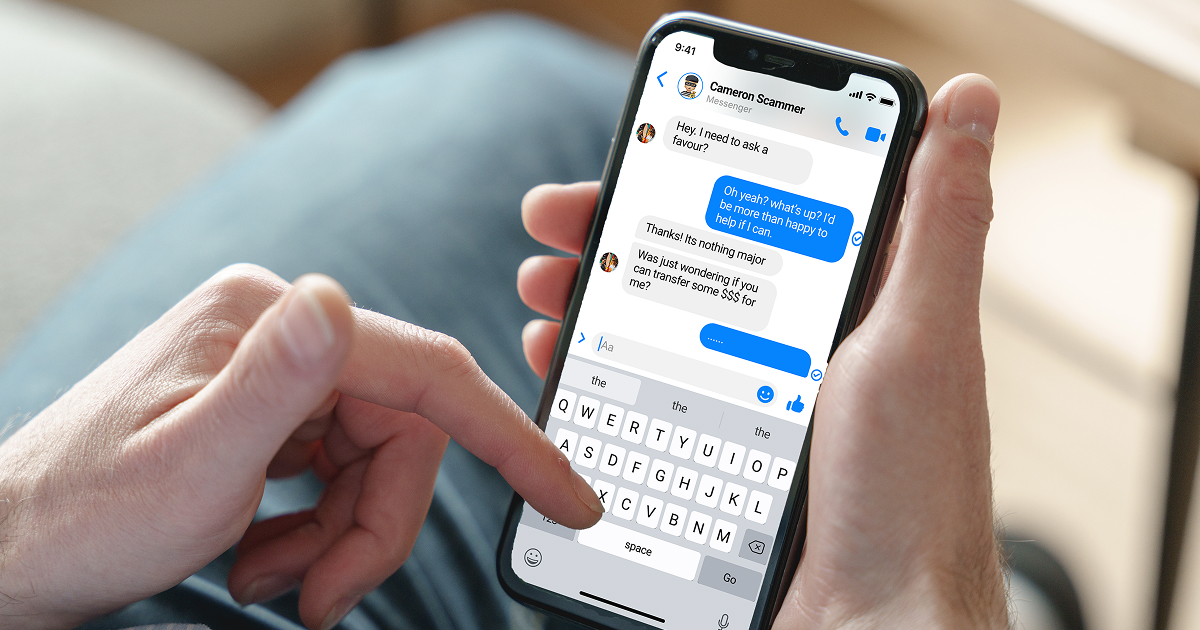
One way scammers can get hold of your details is by having your mobile number transferred from your device to one they control – a strategy known as mobile porting or phone porting.
Once they’ve successfully taken ownership of your number, they’re able to receive your text messages, including any that contain password resets and verification codes.
This allows them to access your online accounts, whether it be banking, email, superannuation, social media or government portals such as myGov.
No prizes for guessing their next step: stealing your identity and your money.
This article is part of our security and fraud info series.
How do mobile porting scams work?
Scammers can reassign your mobile number to their own device in two ways:
- Unauthorised porting: The scammer contacts a different telecommunications provider to the one you currently use and asks them to set up a new account, transferring your number from your current provider.
- Unauthorised SIM card swap: The scammer contacts your existing provider and asks them to activate a new SIM card with your number.
Though telecommunications providers must verify your identity before transferring your mobile service, the information they ask for can be as simple as your name, mobile number, email or date of birth – all of which can be easy for scammers to find online.
Learn more about how to spot phishing scams, which often precede porting attempts.
What to do if you suspect a mobile porting scam
If your phone suddenly loses service (showing SOS Only or No Service) or you receive an unexpected SMS about a transfer request, follow these steps immediately:
1. Contact your mobile provider
Don't wait. Use a landline or a friend's phone to call your phone provider's emergency or fraud line.
The goal: Tell them you have not authorised a port and ask them to freeze your account and the porting request immediately.
Verify identity: Ask them to verify if a new SIM has been issued or if a port to another network is "in progress".
2. Contact Bank Australia immediately
Once a scammer has your number they will likely try to access your mobile banking.
Call the fraud team: Notify us that your mobile security has been compromised.
The goal: The bank can monitor your accounts for suspicious activity, update your security questions, or temporarily restrict digital transfers while you regain control of your number.
3. Change your critical passwords
Use a secure device (like a home computer or tablet on a trusted Wi-Fi) to change the passwords for:
- Your primary email (scammers often use 'forgot password' to gain entry here)
- Your banking portals
- Any social media or MyGov accounts linked to your phone.
4. Secure your digital identity
If a scammer has successfully ported your number, they may have enough of your personal data to attempt identity theft.
- Contact IDCARE: Reach out to IDCARE, Australia's national identity and cyber support service.
- Report to Scamwatch: Document the incident via ACCC's Scamwatch website.
5. Check your accounts for ghost transactions
Even after you get your number back, keep a close eye on your bank statements for at least 30 days.
Scammers sometimes perform small 'test' transactions of just a few cents before attempting a larger theft.
Learn more about mobile phone security and what to do if you lose a device.
How to prevent a mobile porting scam
- Set a pin with your service provider: Contact your telco to add a unique pin or 'porting pin' to your account.
- Enable multi-factor authentication: Use an authenticator app rather than an SMS if possible.
- Monitor your signal: If your phone suddenly shows 'SOS Only' unexpectedly, call your service provider immediately from a different phone.
- Do your best to protect your personal info: Always remain vigilant around phishing emails or texts asking for your birthdate or other personal information. Never click a link on a suspicious email and avoid giving out personal information online wherever possible.
- Alert your bank: If you suspect your SIM has been swapped, notify Bank Australia immediately so their trained staff can help reduce your risk of serious loss.
Stay safe
IDCARE recommends taking the following precautions to protect yourself from mobile porting scams:
- Use multi-factor authentication wherever possible, including using authenticator apps, touch ID, Face ID or biometrics as part of account access requirements.
- Download your banking app onto your mobile device; many of these allow you to temporarily freeze your accounts and cards.
- Check if your financial institution has multi-factor authentication options that don’t rely on using your mobile number for security codes.
- Make a list of accounts that send text messages to your mobile.
- Clear all email folders regularly.
- Never provide personal details over the phone to unsolicited callers.
- Don’t click on links in emails or text messages unless you’ve verified the source.
Suspect a scam?
If you think someone has taken control of your mobile number:
- Contact the Bank Australia fraud team immediately on
- Seek support from services such as IDCARE
- Other warning signs include not being able to log into your online accounts, because a scammer has reset your passwords. Or, you if start receiving welcome emails from a new phone service provider, or alerts from your financial institution about changes to your account.
Get in touch if you need us
Call us on 132 888 or +61 3 9854 4666 if you're outside Australia.
Monday to Friday 8:00am-8:00pm
Saturday 9:00am-2:00pm AEST/AEDT
If you need to report fraud or a scam, please call us immediately. If it's outside of hours, you can contact Fraud Bureau Service on 1300 705 750 or +61 2 8299 9534 if you're overseas.
LiamNeal-09381-1200x800-5b2df79.jpg)
LiamNeal-02154-1200x800-5b2df79.jpg)
LiamNeal-04850-1200x800-5b2df79.jpg)




LiamNeal-0224-1200x799-779f864.jpg)





.webp)